Drum Bus Chain · CELEST DSP × Audio Spices
Drum Spice
Original price:
30 days. Fully functional. An account and newsletter opt-in are required for the free trial.
Shape the punch. Turn up the character. A complete drum bus chain combining CELEST DSP EQ, compression, and tone with Audio Spices doubler, delay, room, and drive.
Two engines, one plugin
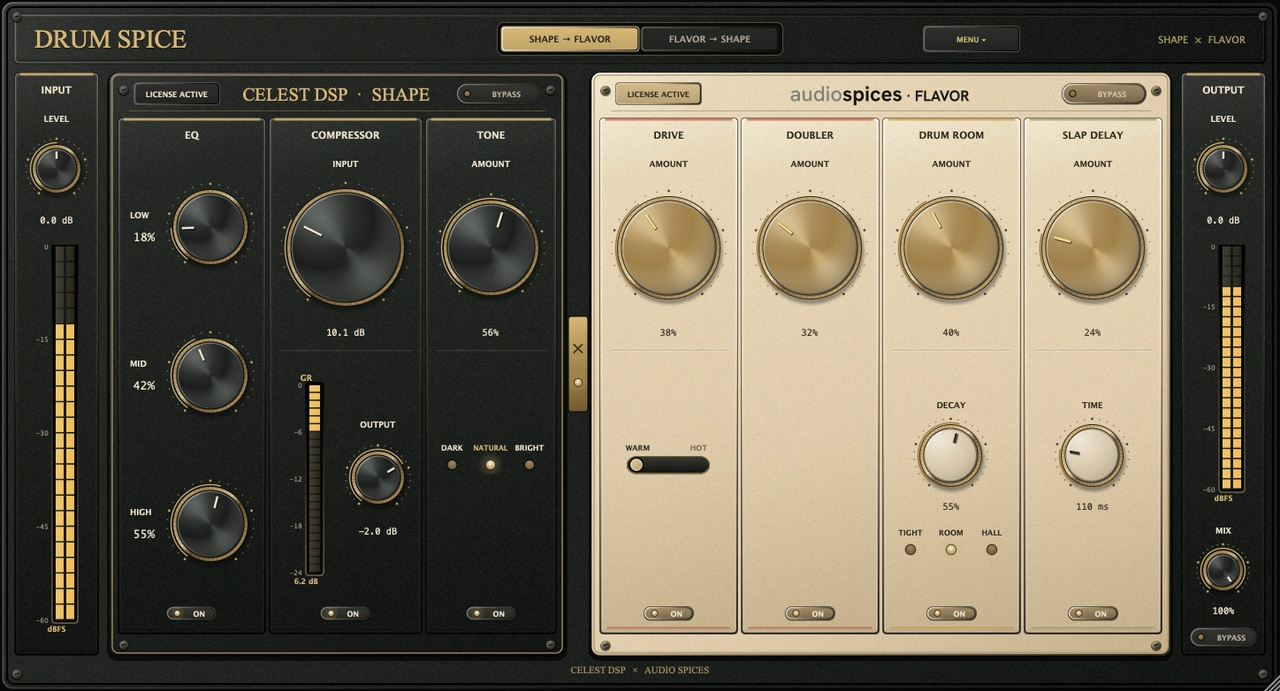
Drum Spice contains two distinct engines, each built and licensed by its maker. The CELEST DSP Shape engine runs EQ into compressor into tone. The Audio Spices Flavor engine runs doubler into slap delay into Drum Room into drive. Every module has its own amount and on switch, and each half has a separate bypass.
CELEST DSP · Shape
EQ, compressor, tone
- Three-band EQ: LOW, MID and HIGH amount dials over CELEST's drum voicings.
- A feedback-style compressor in the FET tradition. INPUT drives the compressor from 0 to +36 dB, OUTPUT provides manual trim from -36 to +12 dB, and the gain-reduction meter holds the transient long enough to read.
- A tone stage with one amount control and three characters: Natural, Dark and Bright.
Audio Spices · Flavor
Doubler, slap, room, drive
- A doubler with two short modulated voices per side, cross-panned with a fixed 40 ms spread so the transient stays focused.
- A slap delay: a single darkening echo from 70 to 250 ms.
- Drum Room, a convolution reverb rendered from Audio Spices' own room model: Tight, Room or Hall, with a DECAY dial that controls the modeled room's RT60.
- The Chilli tape stage running 4x oversampled, Warm or Hot, with a measured makeup curve so loudness stays steady and only the tone changes.
A single ROUTE switch decides the order. SHAPE into FLAVOR keeps the compressor working on the raw kit and places the room behind it. FLAVOR into SHAPE puts the room and drive before the compressor, letting the space move with the hits. INPUT and OUTPUT provide -24 to +24 dB of trim, while the global MIX blends the complete processed chain with the dry kit.
Hear Drum Spice
Compare the original drum performances with Drum Spice applied. Choose a performance, then switch between the untreated and processed signal.
Couldn't load audio. Please try again.
Built to work as one plugin
The two engines share one window, routing system, meter set and installer. Latency from the oversampled drive is reported to the host for automatic compensation. The global mix, each engine bypass and the global bypass keep the dry and processed paths aligned, so blending or comparing does not introduce comb filtering.
Pricing and licensing
Original price:
A purchase gives you the complete Drum Spice license, lifetime updates and authorization on up to three machines. Use the same email with both companies and checkout will provision the matching license in the other account system automatically.
Manual
Every control, an interface tour and how the routing works, in one reference. Read it online or download the PDF.
Support
For the CELEST half: install, activation and the Shape engine, visit CELEST DSP Support & Install. For the Audio Spices half, their team supports the Flavor engine directly at audio-spices.com/support.
Built together, supported by both teams
CELEST DSP designed, built and supports the Shape engine. Audio Spices designed, built and supports the Flavor engine and Drum Room model. Each engine remains licensed by its maker, while a Drum Spice purchase grants access through both account systems. See the rest of Audio Spices' plugins at audio-spices.com.
Formats and requirements
| Formats | macOS: VST3, AU, AAX · Windows: VST3, AAX |
|---|---|
| Platforms | macOS 10.15 or later, universal binary · Windows 10 or later, 64-bit |
| Pro Tools | AAX requires Pro Tools 2018 or later |
| Authorization | Up to 3 machines per license |
| Demo | 30 days, full features, no DRM clicks |
| Updates | Lifetime, no subscription |
| Download size | 26 MB |
Drum Spice FAQ
What is Drum Spice?
Drum Spice is a drum bus plugin made by CELEST DSP and Audio Spices. It combines the CELEST DSP Shape engine (EQ, compressor and tone) with the Audio Spices Flavor engine (doubler, slap delay, Drum Room and tape drive) in one window, with one routing switch and a global mix.
Which plugin formats and systems does Drum Spice support?
VST3, AU and AAX on macOS 10.15 or later (universal binary), and VST3 and AAX on Windows 10 or later (64-bit). The AAX version requires Pro Tools 2018 or later.
Is Drum Spice free?
The full-license giveaway has ended. You can buy Drum Spice or try every feature free for 30 days. The free trial requires an account and newsletter opt-in. If you claimed a license during the giveaway, it is yours to keep.
Do I need an account with both CELEST DSP and Audio Spices?
A Drum Spice license gives you access through both account systems. Use the same email with both companies and the matching license is provisioned in the other account automatically.
How many computers can I use Drum Spice on?
Each license authorizes up to three machines, with lifetime updates and no subscription.
Who supports Drum Spice?
CELEST DSP supports installation, activation and the Shape engine through CELEST DSP Support. Audio Spices supports the Flavor engine and the Drum Room model at audio-spices.com/support.
Explore the interface
Hover or focus a control to see what it does
Drum Spice walkthrough